


AltTabby Gives You a New Dimension of Personalization
Article posted on 9/16/2026
Last month we released an entirely new application that lets you personalize the Alt+Tab experience in Windows. While moving between open windows has been a foundational experience of the daily workflow, it has also lacked some power-user functionality too.
A simple add-on is the ability to pin applications so that you can always jump back to a specific application at any time with a few keystrokes rather than having to tab multiple times. And then there is also the option to make the experience stick so that the task-switching window stays visible even when you release the hotkeys; it’s simple things that can make a big difference to how you navigate Windows.
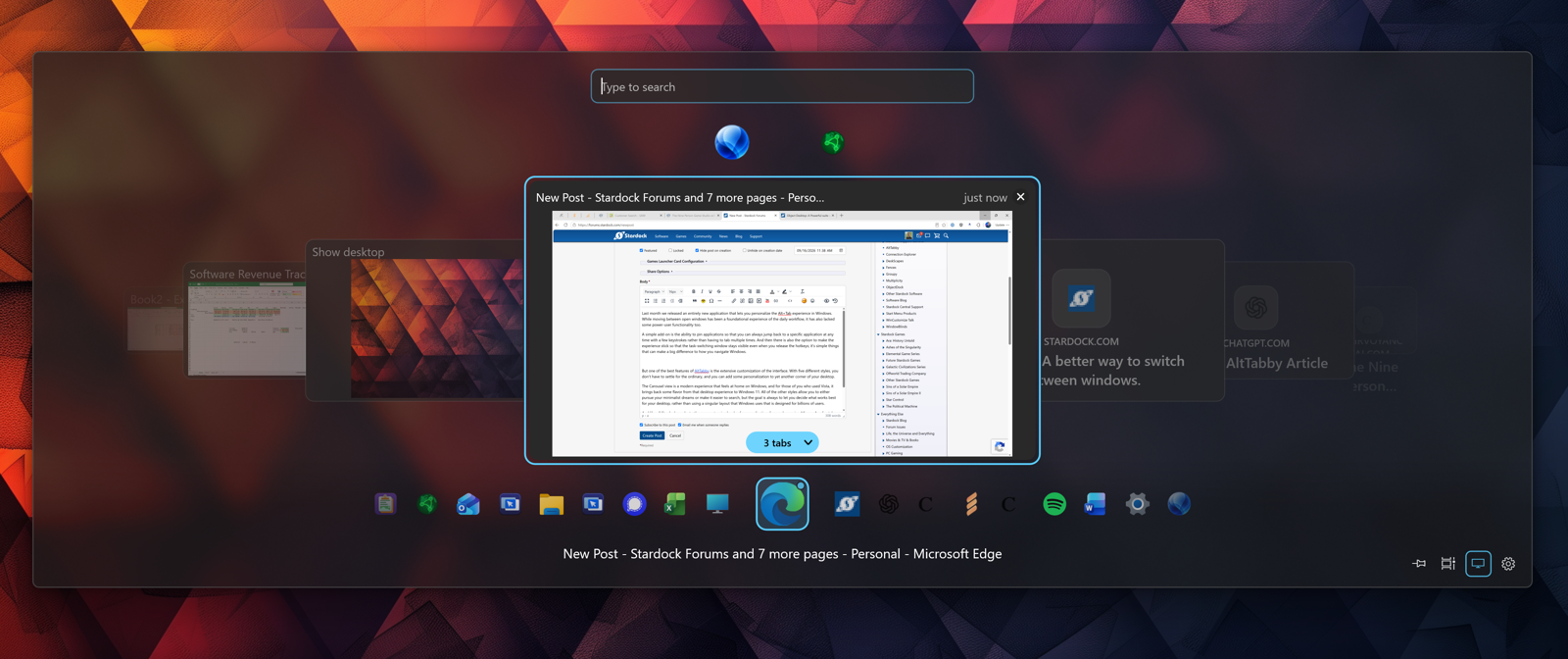
But one of the best features of AltTabby is the extensive customization of the interface. With five different styles, you don’t have to settle for the ordinary, and you can add some personalization to yet another corner of your desktop.
The Carousel view is a modern experience that feels at home on Windows, and for those of you who used Vista, it brings back some flavor from that desktop experience to Windows 11. All of the other styles allow you to either pursue your minimalist dreams or make it easier to search, but the goal is always to let you decide what works best for your desktop, rather than using a singular layout that Windows uses that is designed for billions of users.
And like all Stardock products, there are extensive levels of personalization, from colors, using Mica or Acrylic styles, transparency, fonts, and so much more. If there has ever been something you wanted to change about how Alt+Tab functions or the way it looks, AltTabby was designed for you.
If you want to try out the app, you can do so for free, and it’s also included in Object Desktop as well.

